
Updated for 2026.
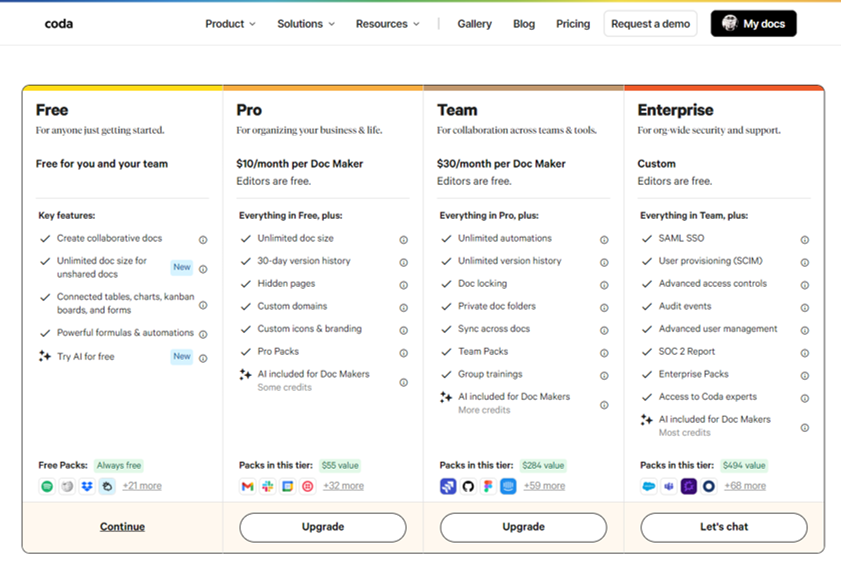
Description:
Coda is an all-in-one productivity platform for businesses that now includes AI to help with knowledge assistance, writing assistance, and task assistance.
Why marketers use Coda:
- All-in-one platform: Coda combines documents, tables, databases, and Kanban boards in one place, making it easy for marketers to manage all aspects of their campaigns.
- Collaboration: Coda makes it easy for marketers to collaborate on projects, share data, and leave comments.
- Customisation: Coda can be customised to fit the specific needs of any marketing team.
Coda AI features include:
It now features an amazing AI co-pilot that delivers the following additional help:
- Knowledge assistance: Coda AI can answer questions about your company’s data, which can help marketers make better decisions.
- Writing assistance: Coda AI can help marketers write emails, blog posts, and other content more efficiently and effectively.
- Task assistance: Coda AI can automate tasks such as sending emails and generating reports, which can free up marketers’ time to focus on more strategic work.
Coda FAQ
If you are considering Coda for planning, collaboration or campaign operations, these are some of the most useful questions to ask before deciding whether it fits your team.
What is Coda used for?
Coda is used as an all-in-one workspace that brings documents, data, workflows and team collaboration into one system. Teams use it to create hubs, trackers, writeups and lightweight internal tools instead of spreading work across disconnected docs, spreadsheets and niche apps.
Why do marketers use Coda?
Marketers use Coda to keep campaign planning, content calendars, meeting notes, approvals, trackers and reporting closer together. That can make it easier to move from strategy to execution without losing context across multiple tools and tabs.
Is Coda more like a document tool or a database tool?
Coda sits between both. It feels familiar like a document, but it also supports tables, views, automations, formulas and connected workflows. That mix is part of what makes it attractive for teams that want something more flexible than a standard doc, but less fragmented than a stack of separate apps.
How does Coda use AI?
Coda includes built-in AI through Coda AI, which it positions as a connected work assistant. It can help users ask questions, brainstorm, create content, summarise information, generate tables and turn data into more useful outputs, which makes it relevant for teams looking to reduce manual work inside their workspace.
Can Coda help marketing teams use AI more practically?
Yes, especially if your team wants AI embedded inside everyday planning and operations rather than sitting in a separate tool. Coda’s AI features can support drafting, summarising, organising knowledge and speeding up repetitive work, which gives marketers a more practical route into AI-enabled productivity.
Does Coda integrate with other tools?
Yes. Coda says it supports 600+ integrations, allowing teams to pull information in, push updates out and connect their workspace with tools such as Slack, Jira, Figma and calendars. That matters if you want Coda to sit inside an existing MarTech or operations stack rather than replace everything at once.